Copilot for Microsoft 365 is licensed per user and available with eligible Microsoft 365 and Office 365 plans, including Microsoft 365 E3 or E5, Office 365 E3 or E5, and Microsoft 365 Business Standard or Business Premium.
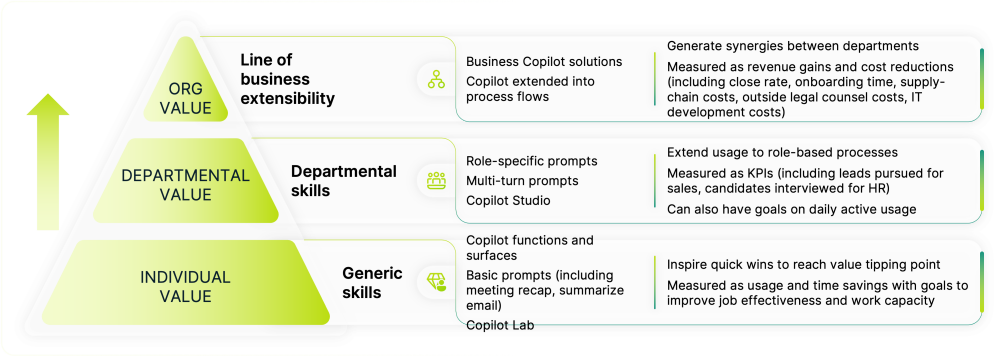
For individuals, Copilot works as a personal AI assistant embedded in the Microsoft 365 apps you already use, such as Outlook, Teams, Word, Excel, and PowerPoint. It helps reduce time spent on drafting, summarising, analysing, and creating content, so you can focus on higher-value work.
How Copilot supports you day to day depends on how licensing and access are set up for your role. This directly affects:
- The tasks Copilot can assist you with
- The information Copilot can safely reference
- How confidently you can use Copilot with your work content
In regulated or security-sensitive environments, licensing and governance settings ensure individuals can use Copilot safely, while still gaining productivity benefits.
Additional capabilities, such as Copilot Studio, allow individuals and teams to automate repetitive tasks or interact with tailored AI assistants, helping reduce manual effort and context switching.
Readiness support helps ensure Copilot licences are assigned to the right people, so individuals can use Copilot securely, confidently, and in ways that genuinely support how they work each day.